

A security scare around website certificates this week has Google, Apple and Mozilla rushing out protections — and while they handled the hard part behind the scenes, there's one thing you should do yourself: update your apps. On October 17, 2026, a researcher reported that private keys for eight eMudhra intermediate CA certificates were generated with insufficient randomness and could be recovered by brute force. Google blocked the affected certificates the same day, but your phone and browser still need to be current. Here's what happened, and exactly how to update your apps on Android and iPhone.
What happened with eMudhra
eMudhra is an Indian digital trust company that issues website identity certificates — the documents that prove a website is who it claims to be. On October 17, security researcher "Wayne" reported to Google's Chrome Root Program that the private keys of eight eMudhra intermediate CA certificates had been generated with insufficient randomness, making them recoverable by brute force (Mozilla's engineers recovered them, demonstrating how serious the flaw was). Anyone holding a compromised key could forge certificates and impersonate legitimate websites.
Response was fast: Google blocked the affected certificates — six of which were authorized to issue website certificates — on October 17 via a background CRLSet update at 19:45 UTC, with no browser update needed. Protection for Android devices and Chromebooks was pushed via Google Play Services around 22:00 UTC on October 19; most devices were covered by Google's October 20 statement, and restarting your phone triggers it immediately. Mozilla also blocked the certificates (Firefox for Android got a follow-up fix 158.0.2), and Apple verified the findings on October 17 and introduced protections on October 19.
eMudhra says the incident is limited to intermediate CA certificates from a Key Generation Ceremony in April 2025, does not affect its root CA private keys, and that only one of the eight was ever used in production — and none ever issued a certificate to any website. CERT-In noted that as of October 21, disclosures did not establish confirmed malicious use of the keys, and no advisory has asked everyday users to change passwords.
What you need
- An Android phone (any recent version) or an iPhone.
- A Wi-Fi connection and your phone charged — updates can take several minutes.
- That's it: no special apps, no paid tools.
Step 1: Update your apps
On Android:
- Open the Google Play Store.
- Tap your profile picture in the top-right corner.
- Select Manage apps and device.
- Under "Updates available", tap See details.
- Tap Update next to an individual app, or select Update all.
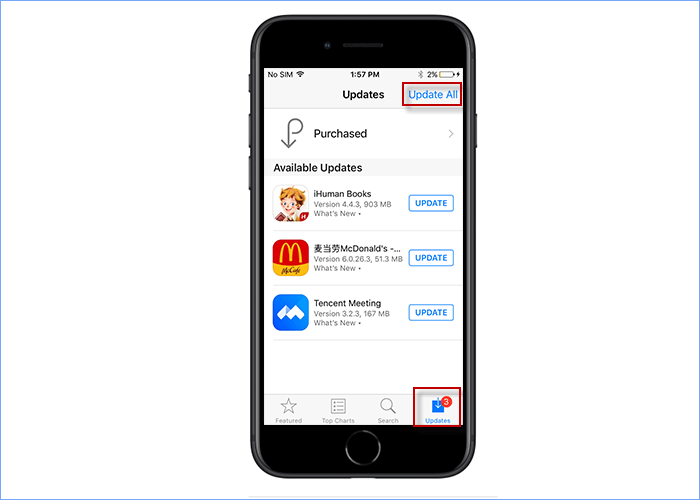
On iPhone:
- Open the App Store.
- Tap your account picture at the top of the screen.
- Select App Updates or scroll to the available updates (the layout depends on your interface).
- Tap Update next to an app, or select Update All.
Step 2: Update your operating system
On Android: go to Settings → System update (on some phones it's Software update — the name varies by manufacturer) and install anything available. Google's eMudhra protection arrived through Google Play Services, so also make sure that's current — restarting your phone triggers the protection immediately.
On iPhone: go to Settings → General → Software Update. If an update is available, follow the on-screen instructions to download and install it. Apple introduced its eMudhra protections on October 19, so anything newer than that has you covered.
Chrome and Firefox picked up the certificate block automatically in the background — no action needed there beyond being current.
What updating fixes — and what it doesn't
What it fixes: keeping apps and your operating system current means you keep receiving security fixes, including the certificate blocks pushed this week. An up-to-date phone is covered.
What it doesn't fix: updating phone apps does not guarantee every application has the latest certificate trust information — browsers, operating systems and individual apps can rely on different certificate stores. And it will not fix an affected website's backend: if a site relied on the distrusted certificate chain, that's the website owner's job to repair, not yours.
Tips and common problems
- Don't click through certificate warnings. If your browser warns about a site's certificate, it may mean the site is mid-migration to a new certificate — or something worse. Heed the warning.
- Never install updates from unofficial sources. Update only through the Play Store and the App Store; sideloaded "security updates" are a classic malware lure.
- Be careful with unsolicited links asking you to log in — phishing emails about security incidents spike after exactly this kind of news.
- No password changes needed. No advisory from Google, Apple, Mozilla or CERT-In has asked everyday users to change passwords over this incident.
- Some legitimate websites relying on the distrusted chain may stop working from around October 27 — if a site you trust suddenly shows a certificate error, check its official social channels for a migration notice rather than bypassing the warning.